Compress PDF Online Free and Reduce File Size
Upload a PDF, choose how much compression to apply, and download the smaller file. Scans and photo-heavy documents often drop 60% to 90%. Set a target size such as 200 KB when a portal has a fixed limit. Text stays selectable, with no sign-up and no watermark.
Uploading...
Your compressed PDF is ready
How to reduce PDF file size online
Quick answer: upload your PDF, choose Balanced, and download the smaller file. Balanced works for most emails, school portals and WhatsApp because it reduces the images inside the PDF to 150 dpi while keeping the text sharp and selectable. If a portal gives you an exact limit, set a target size instead.
- Choose the PDF. Drag it onto the box above or tap to browse. The limit is 40 MB per file.
- Pick a level or a target. Start with Balanced. If the upload form says 200 KB or 1 MB, choose that target and the compressor will step down until the file fits.
- Compress and download. Press the button and wait for the progress bar to finish. A single level is quick. Target mode can take longer because it may try several settings.
- Check before you submit. Open the downloaded PDF once and scroll through it. Look at photos, diagrams and small print.
How much can a PDF file shrink?
Short answer: a scanned PDF usually gets 60% to 90% smaller. A photo-heavy report often gets 40% to 80% smaller. A text-only document may get only 5% to 25% smaller, and a PDF that was already optimized may not shrink at all. There is no fixed percentage, because compression works on the images inside the file.
| What is inside the PDF | Typical reduction | Why |
|---|---|---|
| Scanned pages or photos of paper | 60% to 90% | Camera resolution is far higher than a screen or printer needs |
| Reports with many colour photos | 40% to 80% | Photos are resized and re-encoded at a lower JPEG quality |
| Mixed text and images | 20% to 60% | Text stays sharp while the images get smaller |
| Typed text, tables and vector charts | 5% to 25% | Fonts are subset and duplicate data is removed |
| Already compressed or exported for web | 0% to 10% | There is very little left to remove |
In our own test, a 20.9 MB image-heavy PDF became 1.58 MB on Light, 0.94 MB on Balanced and 0.46 MB on Strong. Text stayed selectable at every level.
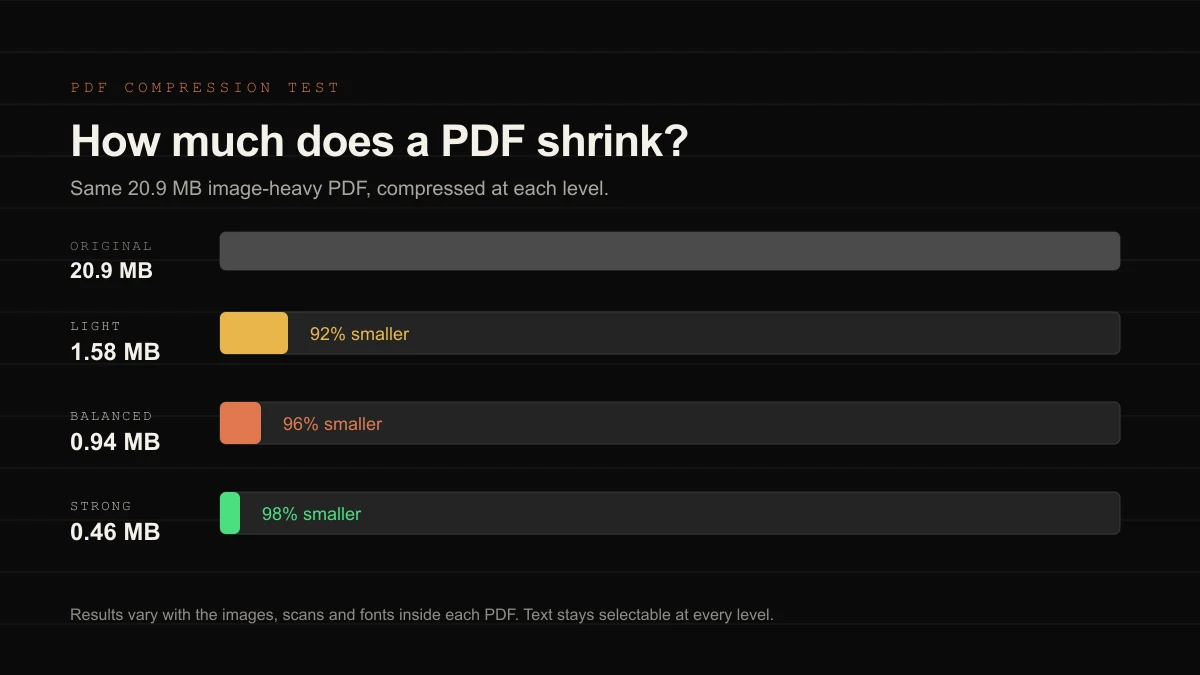
| Test file | Output size | Reduction | Best use |
|---|---|---|---|
| Original PDF | 20.9 MB | 0% | Before compression |
| Light | 1.58 MB | 92% smaller | Printing and detailed images |
| Balanced | 0.94 MB | 96% smaller | Email, portals, WhatsApp |
| Strong | 0.46 MB | 98% smaller | Tight upload limits |
These numbers come from one image-heavy test file. A text-only PDF may shrink far less, and an already compressed PDF may not shrink at all.
Compress a PDF to 200 KB
200 KB is a common limit for school forms, government portals and job applications. Set Target size to Under 200 KB in the form above, or choose Strong if you prefer to pick the level yourself. Target mode starts from good quality and steps down only as far as needed, then stops as soon as the file fits.
| Upload limit | What usually fits | If it still does not fit |
|---|---|---|
| 100 KB | 2 to 6 scanned pages, or 20 or more typed pages | Remove pages and scan in grayscale |
| 200 KB | 5 to 15 scanned pages, or 30 or more typed pages | Remove pages, split the file, avoid full-colour photos |
| 500 KB | 15 to 40 scanned pages | Use Balanced when quality matters more |
| 1 MB | Most school projects and short reports | Nothing, unless the file is mostly photos |
| 2 MB | Long reports with images | Compress the images before adding them |
These are rough ranges for A4 pages, not a promise. A page full of handwriting or dense diagrams needs more space than a typed page.
If the file still will not fit, no compressor can put 100 sharp photographed pages into 200 KB. Something has to give: resolution, colour or page count. Remove pages you do not need, split the document into two files, or scan again at 150 dpi in grayscale. A 200 KB limit is realistic for a form or a short report, not for a full photo album.
Which compression level should you choose?
| Level | Best for | Images | Typical result |
|---|---|---|---|
| Light | Printing at school or a shop | 200 dpi | Small reduction, highest quality |
| Balanced | Email, portals, WhatsApp | 150 dpi | Large reduction, good quality |
| Strong | Tight upload limits | 100 dpi | Smallest file, soft photos |
Use Balanced first. Choose Strong only when the portal or email server rejects the Balanced file. Choose Light when the document will be printed and small details in photos or diagrams must remain clear.
Compress a PDF without losing quality
You cannot remove data and keep every pixel, but you can keep the parts that matter. Text, tables, lines and vector charts are stored as text and shapes, so they stay sharp and selectable at every level. The difference shows up in photos, handwriting and fine detail in scans.
| Level | Image resolution | Photos | Small text in scans | Use when |
|---|---|---|---|---|
| Light | 200 dpi | Sharp | Clear | The file will be printed or checked closely |
| Balanced | 150 dpi | Slightly softer | Readable | Normal reading, email and portals |
| Strong | 100 dpi | Soft | Can blur | Screen reading only, or a very tight limit |
A 200 dpi scan looks close to the original. A 100 dpi scan is fine on a phone or laptop but soft when printed. If the document contains a signature or a stamp that must stay crisp, use Light or Balanced.
Can you compress a scanned PDF?
Yes, and scans usually shrink the most because every page is an image. The compressor lowers the image resolution and re-encodes the photos, while any OCR text layer stays in place. The savings depend on how the scan was made. A 600 dpi colour scan has a lot to remove. A 150 dpi grayscale scan that was already prepared for the web has very little.
- Scan text pages at 150 dpi to 200 dpi in grayscale. Colour adds size without helping readable text.
- Use 300 dpi colour only when colour matters, such as maps, diagrams or photographs.
- Avoid 600 dpi unless the page will be reprinted. It triples or quadruples the file for detail a screen cannot show.
- Keep the original scan. Compression cannot add detail back once it is removed.
Why is your PDF so large?
Most large PDFs are heavy because of images, not text. A scanned page is a photograph, and phone cameras produce much more detail than a screen or printer needs. Long documents with many colour photos, embedded fonts and repeated scans grow quickly.
The compressor re-encodes those images at a sensible resolution and removes duplicate data. Text, lines and shapes are not converted into pictures, so they stay sharp and you can still select and search the words.
Reduce PDF file size for email and upload portals
Email servers usually allow 10 MB to 25 MB per message. School, college and government portals often set much smaller limits, sometimes 1 MB or 2 MB. If a portal rejects the file after Balanced, run the original through Strong or set a target size and check the page count and readability before uploading.
For very tight limits, split a long PDF into two smaller files or remove pages you do not need. Compression reduces the weight of each page, but it cannot make a 100-page scan fit into 200 KB without making the text unreadable.
Online compressor or desktop software?
Both can shrink a PDF. An online compressor is faster when you do not have software installed, and this one works on a phone. A desktop tool keeps the file on your computer, which some offices and schools require.
| This online compressor | Desktop software | |
|---|---|---|
| Install | Nothing to install | App and often a licence |
| Price | Free | Usually paid |
| Works on a phone | Yes | Usually no |
| File leaves your device | Yes, processed and then deleted | No |
| Exact target size | Yes, from 100 KB to 2 MB | Depends on the app |
| Batch files | One file at a time | Often batch |
Is it safe to reduce PDF file size online?
The uploaded PDF is processed temporarily on the server and is not added to the project record. The compressed copy is returned to your browser and the temporary file is deleted. Do not upload a document if your school, employer or client does not allow it to be processed by an online service.
When compression is not the right fix
- The PDF is already optimized. Re-saving can add overhead, so we return your original instead of a larger copy.
- The file is mostly typed text. There are no large images to shrink, so expect a small reduction.
- The PDF is password protected or damaged. Unlock it or export a fresh copy first.
- The target is smaller than the content allows. Remove pages or split the file instead of forcing a lower setting.
If you need fewer pages rather than a smaller file, remove the pages you do not need or split the document first. For a full project file with a front page, certificate and index, use the project generator instead of assembling pages by hand.
For a longer walkthrough with target sizes, email limits and quality checks, read how to reduce PDF file size online.
Frequently asked questions
How much size can be reduced on a PDF file?
A scanned PDF usually drops 60% to 90% because the pages are high-resolution images. A report full of photos often drops 40% to 80%. A text-only PDF may drop only 5% to 25%, and an already optimized PDF may not shrink at all. The result depends on the images inside the file, not on the page count alone.
Can I compress a PDF to 200 KB?
Yes, most short documents can reach 200 KB. Set Target size to Under 200 KB and the compressor steps down through lower image settings until the file fits. A 200 KB limit suits a form or a short report. It is not realistic for dozens of sharp photographed pages, because something has to give: resolution, colour or page count.
Does compressing a PDF reduce quality?
It can, because most of the savings come from re-encoding images inside the PDF. The Light setting targets print quality, Balanced is the best default for screen and email, and Strong gives the smallest file with visible softening in photos. Text and vector lines stay sharp at every setting.
Which compression level is best for email?
Balanced is the best default for email attachments. Use Strong, or a 1 MB target, if the mail server still rejects the file. Use Light only when the PDF will be printed and image detail matters. When you set a target size, the level is ignored and the compressor chooses the settings for you.
Can I compress a scanned PDF?
Yes. Scanned PDFs are made of images, so they usually shrink the most. Choose Balanced for readable scans, or set a target size when the limit is tight. A 600 dpi colour scan has far more to remove than a 150 dpi grayscale scan that was already prepared for the web.
Why is my PDF still too big after compression?
The pages are probably full of high-resolution photos or handwriting, or the PDF was already compressed. Try the target mode, remove pages you do not need, split the file, or scan again at 150 dpi in grayscale. No compressor can fit a long colour scan into a very small limit without visible damage.
What is the maximum PDF size?
You can upload a PDF up to 40 MB. Files are processed on the server and deleted as soon as the download is sent.
Why did my PDF get bigger?
Some PDFs are already optimized, so re-saving can add a little overhead. When that happens we return your original file and tell you, instead of making you download a larger copy.
Does the PDF compressor work on a phone?
Yes. Open the page in your phone browser, choose a PDF from Files or Downloads, select a level or target size, and download the smaller file.
Does the compressor work on password-protected PDFs?
No. Remove the password or export an unlocked copy first, then upload it.
Is the PDF compressor free?
Yes. There is no sign-up, no watermark and no page limit. Files up to 40 MB are free.
Are my PDF files stored?
The uploaded PDF is processed temporarily on the server and is not added to the project record. The compressed copy is returned to your browser and the temporary file is deleted. Do not upload a document if your school, employer or client does not allow it to be processed by an online service.